Docs / Get Started
MACSONG at a glance
A native macOS music player in the spirit of classic 1999 Winamp — hand-drawn skins, a lime 7-segment display, real tactile controls, and a GPU visualizer that moves with your music.
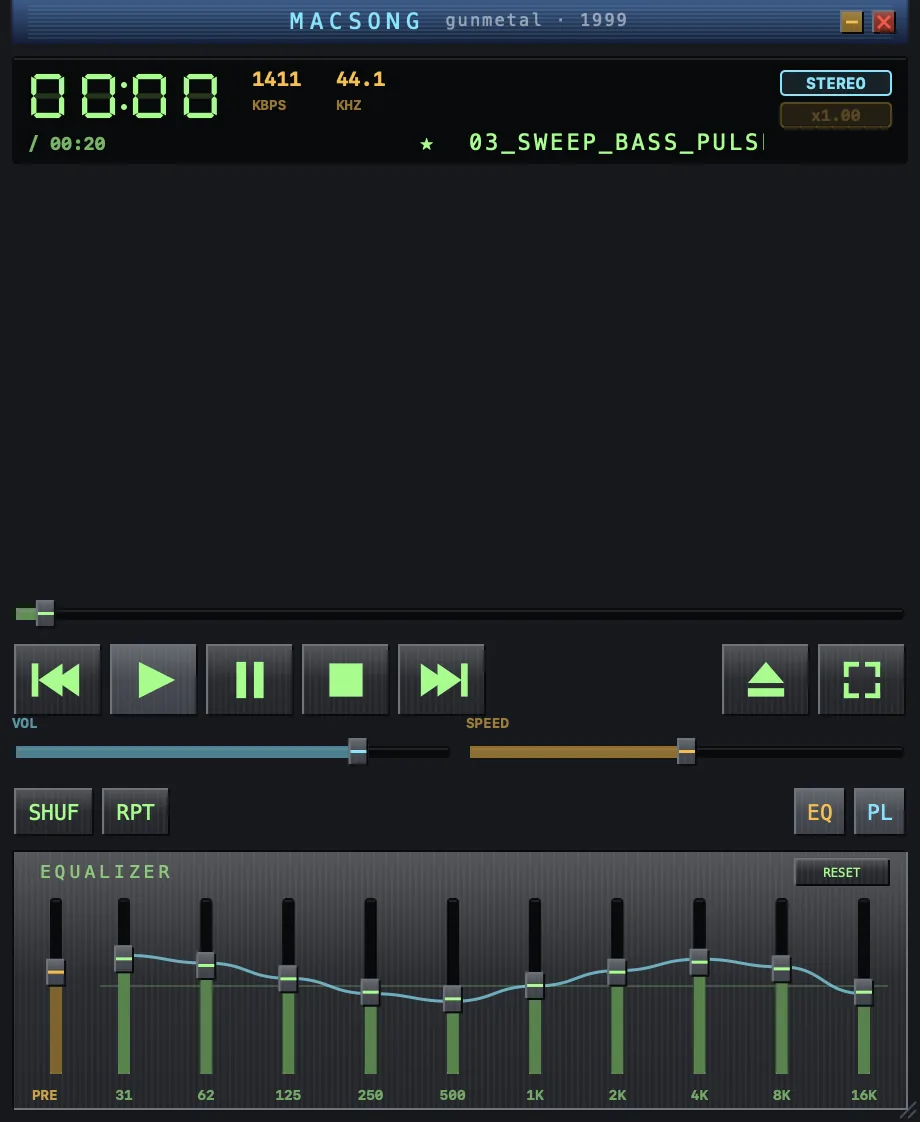
The player window
Top to bottom:
- Display — 7-segment elapsed time, bitrate and sample rate, stereo badge, playback speed, and the scrolling track name. Playback & the display ›
- Visualizer — six real-time effects driven by the audio. Visualizers & fullscreen ›
- Seek bar and transport — previous, play, pause, stop, next, plus eject (open files) and fullscreen.
- VOL and SPEED sliders, and the SHUF / RPT mode buttons.
- EQ and PL — toggle the equalizer strip and the playlist window.
What it believes
Your music should feel like it belongs to you. MACSONG plays your files, where they are — no accounts, no streaming, no scanning, no cloud. Everything runs on your Mac and nothing is collected.
Requirements
| macOS | 14 Sonoma or later |
|---|---|
| Hardware | Any Mac that runs Sonoma (the visualizer uses Metal, available on all of them) |
Next steps
- Open your music — three ways to get tracks playing.
- Skins — make it yours with ⌘1–⌘5.
- Keyboard shortcuts — the full reference.